
Contractors · Expiration tracking
Contractor bond, ARL, and medical exam expirations: how to track them
Contractor document expirations are the dates when the records a company requires from its third parties stop being valid: social security contributions and ARL coverage, occupational medical evaluations, work at heights certificates, SOAT, vehicle inspections, and contract bonds. Tracking them means calculating each validity period from the issue date, warning before it expires, and defining what happens when it does.
This page cites regulations as examples. The validity period of each document is set by the applicable regulation or contract, and the reference is always its current text.
Which contractor documents expire, and why
A contractor doesn’t hand over a file that gets archived forever. It hands over records that prove a condition at a given moment: that it’s up to date on its contributions, that a doctor evaluated its worker’s fitness, that its vehicle is insured, that the contract is backed by a bond. That condition changes, which is why each record has a validity period: the time during which the hiring company accepts it as valid.
The most useful way to organize them is by the element type they belong to, because the effect of an expiration depends on it. A person who can’t enter is not the same as a piece of equipment that can’t be used.
Person
Proof of social security contributions, including occupational risk coverage with the ARL (Colombia’s occupational risk insurer), occupational medical evaluations, and certificates such as work at heights.
Vehicle
SOAT, the technical, mechanical, and emissions inspection, and any other records the company requires before letting it in.
Machinery and equipment
The records the company defines to authorize its use in the operation. The hiring company decides which documents and with what validity period.
Company and contract
The bonds or guarantees the contract requires, and the contractor company’s documents that the hiring company asks it to keep up to date.

Which documents each element must provide isn’t decided in expiration tracking: that’s the job of the document requirements matrix, which defines them by element type, activity type, and profile. Some companies also assign a validity period to induction, covered in the guide to virtual contractor induction. This article covers what comes next: keeping those documents valid.
Documents for people: contributions, medical evaluations, and work at heights
Social security contributions and ARL
Social security contributions are paid by period. Proof for one period doesn’t cover the next, so it’s the document requested most often over the life of a contract. What to verify and how to read the record is explained in the guide to contractor social security.
Occupational medical evaluations
They’re regulated by Resolution 1843 of 2025 of the Ministry of Labor, which repealed Resolution 2346 of 2007. Its Article 15 doesn’t set a single deadline for all workers: it provides that each company, within its OHS (occupational health and safety) management system (SG-SST), defines how often evaluations take place, technically justified by exposure to risk factors and within the limit that the same article sets.
The same article adds two clarifications. Specific fitness certificates, such as the one for work at heights, have the validity period set by their own regulations. And the validity of contractors’ evaluations is governed by Article 2.2.4.2.2.18 of Decree 1072 of 2015. The expiration date depends on who the person is and what risk they’re exposed to.
Work at heights
Resolution 4272 of 2021 of the Ministry of Labor sets the minimum safety requirements for work at heights. It requires workers exposed to that risk to hold their certificate, and authorized workers to be retrained by the employer or hiring company. The resolution states that the certificate’s validity doesn’t exempt anyone from retraining, and its Article 27 defines the situations in which retraining takes place. For tracking purposes, that means watching two dates: the certificate’s and the last retraining’s.
Documents for vehicles, equipment, and the contract
SOAT and vehicle inspection
Article 42 of Law 769 of 2002, Colombia’s National Land Traffic Code, provides that every vehicle traveling in the country must be covered by valid mandatory insurance: the SOAT (Seguro Obligatorio de Accidentes de Tránsito, Colombia’s mandatory traffic accident insurance). Articles 51 and 52 of the same law, amended by Law 1383 of 2010 and Decree 019 of 2012, regulate the technical, mechanical, and emissions inspection (revisión técnico-mecánica), with a frequency that depends on the type of service and the registration date. Vehicle tracking can’t use a single validity period for every vehicle.
Machinery and equipment
There’s no single list of documents for equipment. Each company defines which records it requires to authorize its use and with what validity period. What changes compared with a person is the effect: an expired record doesn’t keep someone from entering, it keeps the equipment from being used.

Contract bonds
A contract’s bonds or guarantees have the validity period that contract sets: which coverages are required and for how long. There’s no general rule, and the validity period is recorded against the contract, not against a person.
Why manual tracking falls short
Many companies track expirations with a spreadsheet, the contractor’s emails, and a shared folder. It works with a few third parties. With dozens of contractors, each with people, vehicles, and equipment, predictable failures appear:
- The expiration date is typed in by hand, and a mistake goes unnoticed until the document has already expired.
- No one gets a warning: the spreadsheet shows the date, but someone has to remember to check it.
- The new document arrives by email and isn’t always filed, nor is the date updated in the spreadsheet.
- The gatehouse doesn’t check the spreadsheet, so a person or vehicle can enter with an expired document.
- When an audit asks who reviewed a document and when, the answer depends on searching through emails.
The problem isn’t the tool. It’s that tracking depends on a person remembering to do it. An expiration that doesn’t trigger anything on its own is discovered late: at the gatehouse, in an audit, or after an incident.
How to track an expiration well
Expiration tracking that works has six parts, and none of them depends on anyone’s memory.
- Validity from the issue date The expiration date is calculated from the document’s issue date and the frequency defined for that document type. It isn’t typed in.
- Advance notice Each document type has its own number of days’ notice, set to the time the third party needs to renew it.
- “Expiring soon” status Between the warning and the expiration, the document sits in a visible status that lets you filter and prioritize.
- Re-request to the third party The contractor knows which document it must replace and uploads it before it expires.
- Defined effect What happens on expiration is decided in advance: the person doesn’t enter, the equipment isn’t used, or the contract is affected.
- Evidence Each document, its review, its approval or rejection, and its replacement are logged with the person responsible and the date.
| Document | Element | What sets its validity | Effect on expiration (example) |
|---|---|---|---|
| Proof of social security contributions and ARL | Person | The contribution period: each period requires its own proof | Entry-restrictive: the person doesn’t enter |
| Occupational medical evaluation | Person | The frequency the company defines in its SG-SST (Resolution 1843 of 2025, Art. 15) | Entry-restrictive: the person doesn’t enter |
| Work at heights certificate | Person | Resolution 4272 of 2021: certificate and retraining | The person isn’t cleared for the work-at-heights activity |
| SOAT | Vehicle | The policy’s validity period (Law 769 of 2002, Art. 42) | Entry-restrictive: the vehicle doesn’t enter |
| Vehicle inspection | Vehicle | Type of service and registration date (Law 769 of 2002, Arts. 51 and 52) | Entry-restrictive: the vehicle doesn’t enter |
| Equipment record the company requires | Machinery and equipment | The company’s document requirements matrix | Use-restrictive: the equipment isn’t used |
| Contract bond | Company and contract | The terms of the contract | Contract-restrictive |
The table is an example. The regulation says which document must be valid; the company decides whether its expiration blocks entry, use, or the contract, or only triggers a warning.
How to set up expiration tracking, step by step
- List the documents that expire Start from the document requirements matrix and mark which documents have a validity period and which are requested only once.
- Note what sets each validity period For each document: the applicable regulation, the company’s SG-SST, or the contract. If it isn’t clear, check before you set it.
- Set the notice days Estimate how long a third party takes to renew each document and set the warning with that margin.
- Decide the effect of expiration For each document: whether it blocks entry of the person or vehicle, use of the equipment, or the contract.
- Assign who reviews the replacement Define who approves the new document and against which criteria.
- Bring the status to the gatehouse The document’s status has to be available where entry is authorized, not just in the office.
- Keep the evidence Keep each document’s history: when it arrived, who reviewed it, and what they decided.
In that order, tracking answers a single question at the gatehouse: whether the element is cleared for entry today.
Expiration tracking can run in a system
What a system changes is that calculating, warning, and blocking no longer depend on someone remembering.
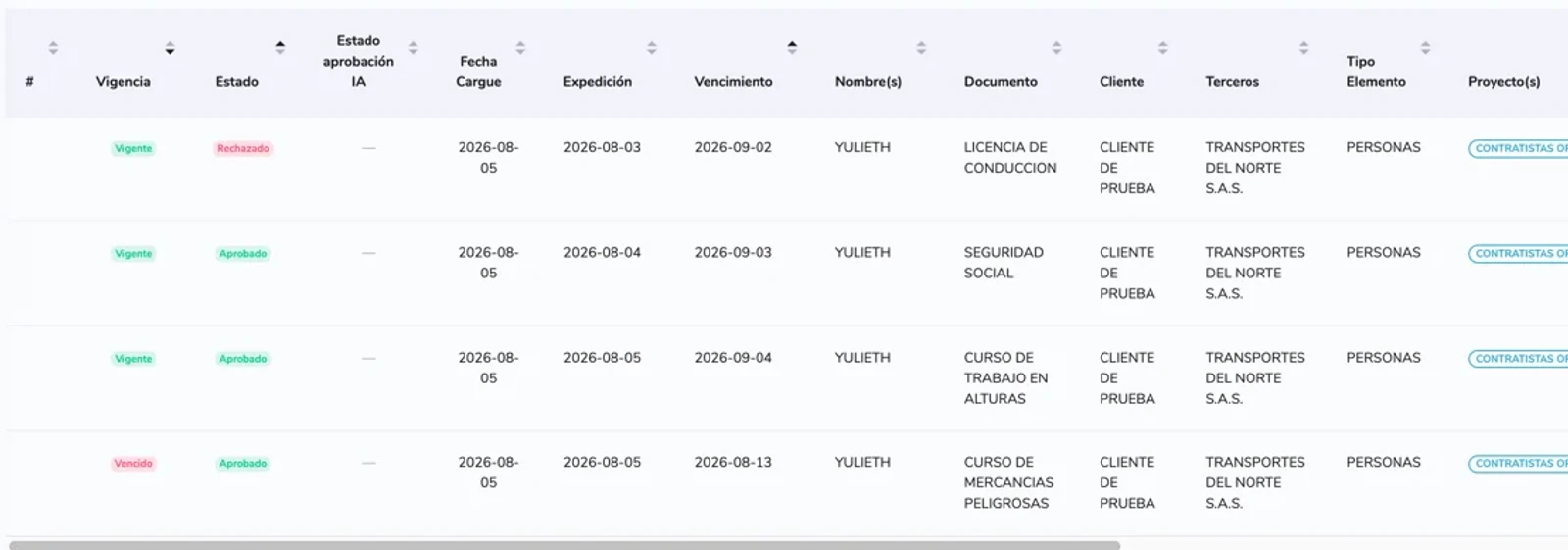
In NAVA 360, your company configures in the document requirements matrix the expiration frequency and advance-notice days for each document, and whether it’s entry-restrictive, use-restrictive, or contract-restrictive. The contractor uploads the document with its issue date, and the system calculates the expiration. Your team filters what’s valid, expired, and expiring soon, and at the gatehouse, a lookup by ID number, license plate, or serial number shows whether the element is cleared for entry. If an entry-restrictive document is expired or rejected, access is denied.
What NAVA doesn’t do
NAVA runs expiration tracking, not the underlying obligations. Specifically, NAVA:
- Doesn’t set the validity period of each document: the regulation, your SG-SST, or the contract sets it, and your company configures it
- Doesn’t decide which documents your company requires from each third party
- Doesn’t perform medical evaluations or issue work at heights certificates
- Doesn’t issue or renew bonds, SOAT policies, or vehicle inspections
- Doesn’t provide legal advice
What NAVA runs is the document’s cycle: calculating the validity period, warning, review, blocking, and evidence.