NAVA 360 · Third-party qualification and management

Turn third-party management into operational control

NAVA 360 connects the requirements, information, and conditions your company needs to register, verify, qualify, and monitor suppliers and contractors. Less manual work. More visibility into who’s cleared to operate and what needs attention.

Third-party control center
Updated 2 min ago
Overall compliance87%
Expiring soon9
Pending review12
JO

Jhon OspinaContractor · Work at heights

Cleared for entry
ARLValid until Sep 28, 2026approved
Work at heightsExpires in 6 daysexpiring soon
OHS inductionCompleted Aug 12, 2026certified
  • Requirements, training, and conditions
    connected
  • 24 hmaximum validation time
    with the Plus plan
  • 4ways to look someone up
    from access control

Current management

The problems with managing contractors manually

Excel can list files and dates, but it doesn’t link each requirement to the activity, the review, and the entry authorization.

01Scattered information

Spreadsheets, emails, and folders show different versions of the same requirement.

02Manual expirations

Renewals depend on someone checking and updating the dates.

03Decisions outside the system

The gatehouse calls or sends messages to ask whether someone can come in.

04Separate evidence

Reviews, inductions, and exceptions get pieced back together when an audit is coming up.

Document requirements matrix

Requirements by contractor type, vehicle, and machinery

NAVA turns the conditions your company defines into rules that apply to each company, person, vehicle, or machine. You can set which requirements apply based on activity, element type, validity period, who reviews them, and restrictive status.

MDocument requirements matrix · Electrical maintenance
42 requirements
RuleWork-at-heights certificateSOATVehicle inspection
ElementPersonVehicleMachinery
ActivityWork at heightsTransportationLifting
Validity period12 months18 months6 months
Alert30 days before20 days before15 days before
ReviewBack officePre-approved by AIInternal team
Restrictive status entry entry use
Requirements are set up once, and NAVA applies them throughout the qualification cycle. Last change: Laura M. · Aug 12, 2026

On the platform

How the document requirements matrix is set up

Two minutes on the real screen: how a requirement is created, which element type it applies to, how long it stays valid, and who’s responsible for approving it.

Setting up the document requirements matrix in NAVA 360 Video in Spanish. Software NAVA channel

Restrictive documents

Not every noncompliance has the same impact

NAVA lets you define which conditions affect entry, the use of an element, or the continuity of a contractual relationship, so each noncompliance gets a response that fits the operation.

Traceable exceptions

When your company authorizes an exception, it’s recorded with the person responsible, the date, and the justification.

  1. 01
    People and vehicles

    Entry-restrictive

    Blocks access while the requirement is expired or rejected.

    Access blocked
  2. 02
    Machinery, equipment, and tools

    Use-restrictive

    Takes the element out of operation until the document is valid again.

    Equipment disabled
  3. 03
    Contractor company

    Contract-restrictive

    Affects the continuity of the contractual relationship, not just a single entry.

    Contract restricted

Third-party portal

Third parties manage their information. Your team manages compliance.

Each supplier or contractor can register its people, vehicles, and machinery, upload the required information, and see the comments left by the team in charge. For large volumes, it can use bulk upload templates.

Jhon Ospina’s documents8 of 9 approved
Qualified activityWork at heightsqualified
ARLValid until Sep 28, 2026approved
Work-at-heights certificateExpires in 6 daysexpiring soon
Medical examComment: missing the doctor’s signaturerejected
OHS inductionApproved on Aug 12, 2026certified

People Job title, EPS (health insurer), pension fund, ARL (Colombia’s occupational risk insurer), risk class, blood type, emergency contact, and photo.

Vehicles and machinery License plate or serial number, element type, activities, documents, and qualification status.

Administrative result Your team receives the information in NAVA and reviews the records without retyping them.

Process

From registration to monitoring: a continuous qualification cycle

NAVA 360 connects the different stages of third-party management so the information follows the whole process, from onboarding to monitoring conditions and performance.

  1. 01Your team

    Registration

    Links the third party to contracts, sites, projects, and activities.

  2. 02NAVA 360

    Requirements

    Applies the conditions and requirements that correspond to each company, person, vehicle, or machine.

  3. 03The third party

    Sign-up and upload

    Registers its elements and uploads the required information.

  4. 04Your team or NAVA 360

    Verification

    Approves, rejects, or leaves it pending based on the defined criteria.

  5. 05The third party

    Induction

    Watches the content, takes the assessment, and gets the certificate.

  6. 06Access control

    Entry

    Looks up an ID number, license plate, serial number, or QR code.

  7. 07NAVA 360

    Monitoring

    Tracks expirations, training, compliance, and supplier and contractor performance.

Operational monitoring

Qualification doesn’t end when the third party complies

Conditions change. Documents expire, training has to be renewed, and supplier performance evolves. NAVA keeps track so your team can get ahead of noncompliance and make decisions with up-to-date information.

01

Document expiration alerts

NAVA calculates expiration dates and generates alerts based on the configured lead times.

PersonRestrictiveExpiring soon
  • Work-at-heights certificateJhon Ospina · expires Aug 19
    6 days
  • SOATVehicle WXR-482 · expires Aug 24
    11 days
  • Contract insurance policyIndustrias del Norte · expires Sep 2
    20 days
02

Contractor induction

Your company sets up the video, questions, minimum passing score, validity period, and restrictive status.

OHS induction · 05:18
Result90%certified
If it’s restrictive, the person isn’t cleared until they pass it.
03

Contractor access control

The gatehouse looks up an ID number, license plate, serial number, or QR code and opens the restriction details when needed.

1.045.887.204 ⌕
Cleared for entry
Company
Industrias del Norte
Activity
Work at heights

Document validation

Document validation with review criteria

The reviewer —your team, NAVA’s back office, or, if you turn on the AI verification package, the NAVA engine— opens the file alongside the dates and the criteria your company defined. When the reviewer approves, rejects, or leaves it pending, NAVA records the decision, who made it (person or system), and the date.

BasicYour team handles validation.
PlusNAVA’s back office validates within 24 hours at most.
Review 12682 of 5 criteria
PDF
Work-at-heights certificateJhon Ospina · expires Sep 28, 2026
under review

Content criteria

  • Name and ID number match
  • Authorized training center
  • Valid number of training hours
  • Legible issue date
  • Signature of the person in charge

Audit

Contractor document traceability

NAVA keeps the traceability of the information and decisions that make up the cycle: assigned requirements, uploaded documents, reviews, training, changes, entries, and authorized exceptions.

  1. AUG 12 · 8:16 AMDocument replacedUploaded by the contractor
  2. AUG 12 · 10:42 AMDocument approvedLaura Méndez · criteria 5/5
  3. AUG 13 · 6:42 AMEntry loggedGatehouse · Planta Norte

Monitoring

Turn information into indicators for making decisions

NAVA consolidates information from the qualification cycle so your team can identify compliance, pending items, risks, and how your third parties are performing.

Documents uploaded184 / 19694%
Documents approved172 / 18493%
Documents rejected7Need correction
Inductions completed81 / 8694%
Overall compliance91%Calculated by NAVA
Operational response Cleared for entry Yes or no, based on the restrictive documents

The real product

What NAVA 360 looks like inside

See the screens that teams responsible for managing third parties use every day. NAVA connects information, decisions, and monitoring so the qualification cycle is visible and traceable.

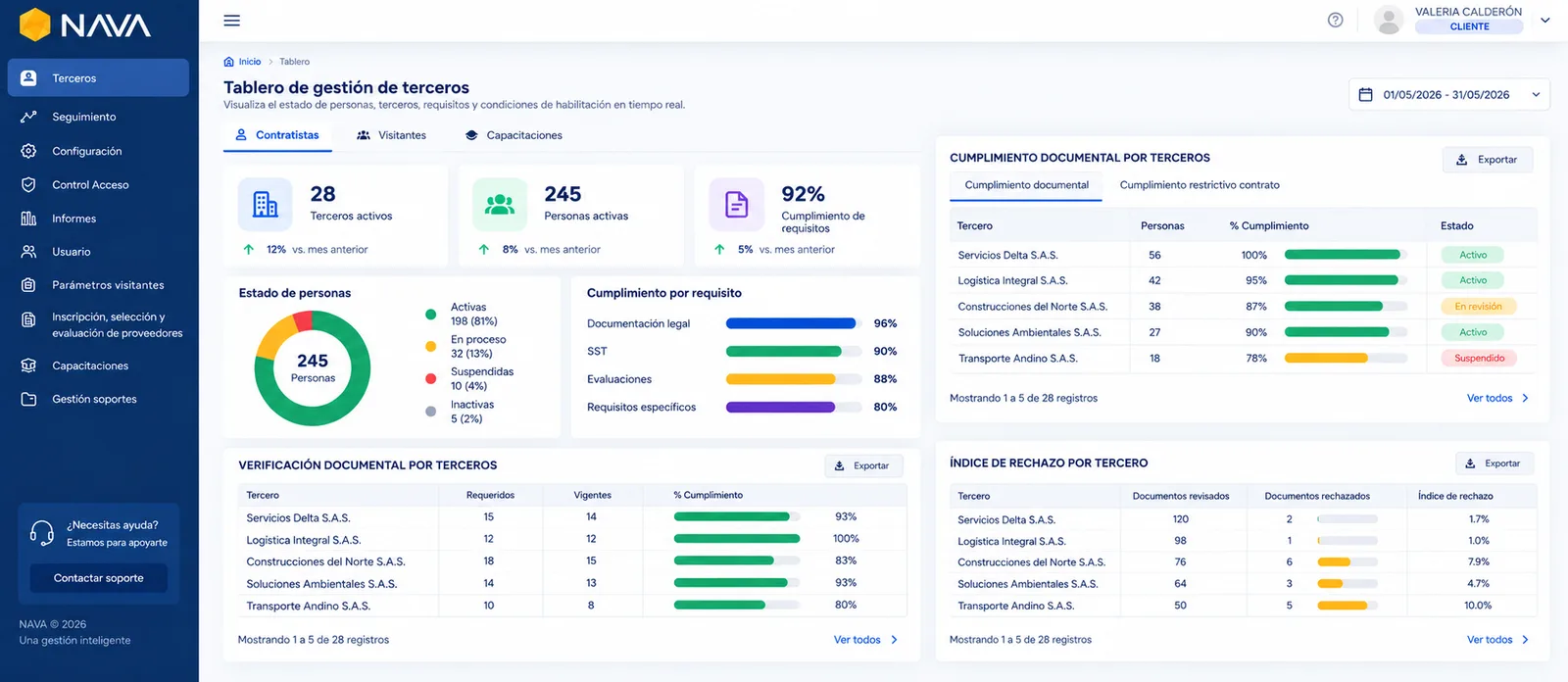
NAVA 360 dashboard with indicators for active contractors and workers, document and training compliance, and expired documents
The dashboard shows the status of people, third parties, requirements, and qualification conditions.
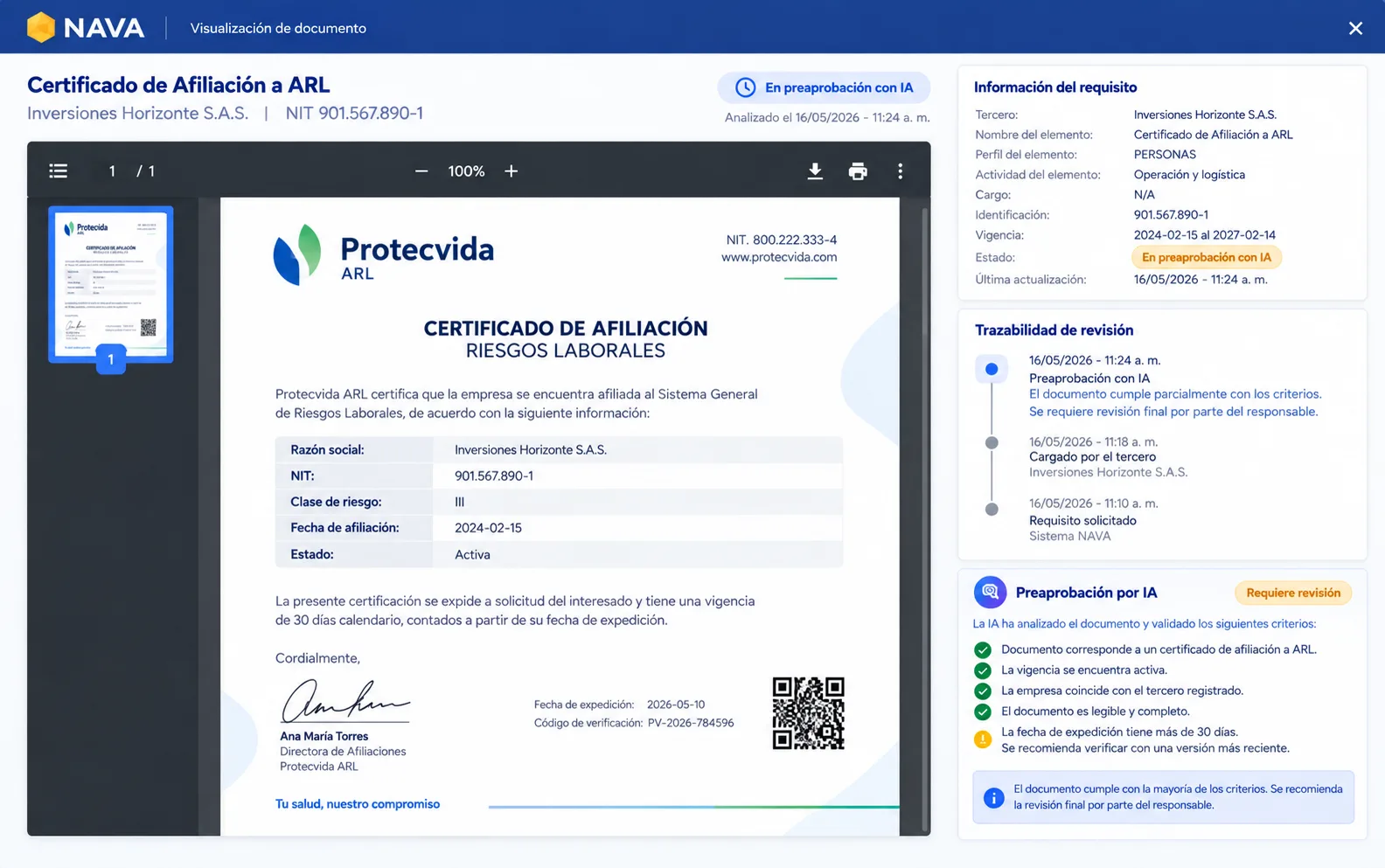
Document verification in NAVA 360: the uploaded document next to its status, its dates, and the review criteria applied
Each requirement shows its information, validity period, status, and review traceability.
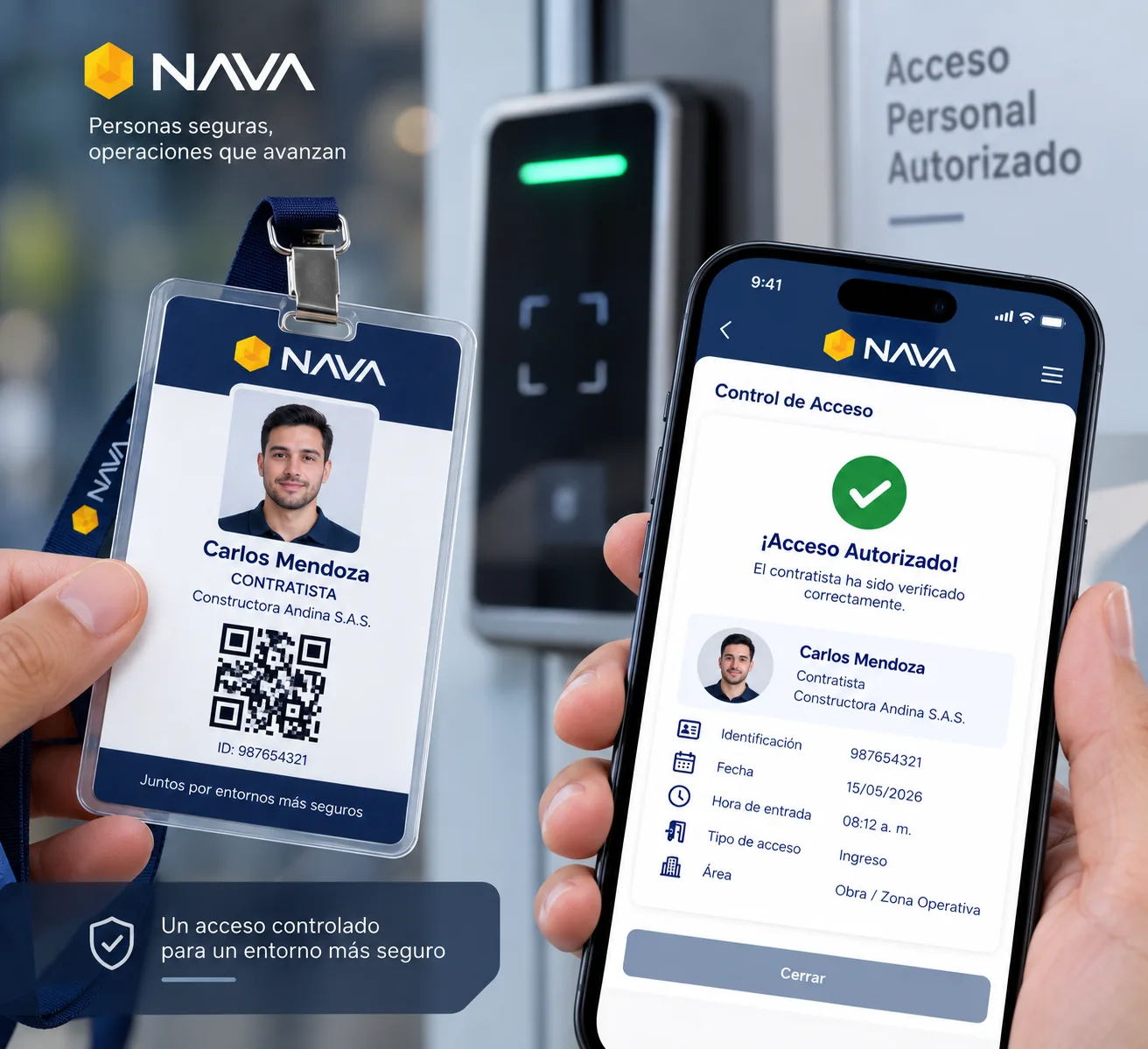
NAVA 360 contractor ID badge with a QR code, photo, and the element’s identification details
The ID badge and QR code can serve as identification and lookup tools during operations.

Plans

A solution that adapts to the size of your operation

NAVA 360 is configured according to the volume and characteristics of the third parties you manage. You can choose to handle validation yourself, get support from NAVA’s back office, or add artificial intelligence.

See the plans 30-day free trial

Frequently asked questions

Questions about qualification and third-party management

What is an element in NAVA 360?

A person, vehicle, or piece of machinery belonging to a third party whose information goes into NAVA. Your plan is calculated on those elements, not on the internal users who log in to the platform.

Do we have to build the document requirements matrix from scratch?

Not necessarily. You can bring over your existing requirements and set them up with the conditions, validity periods, owners, and restrictions that apply. NAVA supports you through the initial setup.

Does NAVA 360 handle vehicles and machinery?

Yes. It can manage different types of elements and define the requirements, validity periods, activities, and qualification conditions for each one.

Who uploads the third parties’ information?

Each third party manages its own information and handles the uploads. For large volumes, it can also use bulk upload templates.

How do you upload hundreds of workers?

The contractor uses an Excel template to create people, vehicles, or machinery in a single upload.

Who reviews contractor documents?

On the Basic plan, your team reviews them. On the Plus plan, NAVA’s back office reviews them: a team of trained people dedicated exclusively to document review, within 24 hours at most. Either plan can add the AI verification package, which runs a first automatic review and speeds up approval. All of them use the criteria set up in the document requirements matrix.

Does NAVA use artificial intelligence to verify documents?

Yes. NAVA uses artificial intelligence to support the verification of information and documents. The technology can help identify data, dates, and inconsistencies, while the criteria your company defines guide the decision. It’s an add-on to whichever plan you choose.

How do expiration alerts work?

The matrix sets the validity period and the alert days. NAVA calculates the date and marks the document as expiring soon during the configured lead time. These alerts go to the third party’s email, letting them know it’s time to upload the new document.

Can training be part of qualification?

Yes. When your company sets a training or induction as a restrictive condition, it can be one of the requirements that must be met to reach qualified status.

Can I track my suppliers’ performance?

Yes. NAVA lets you manage the evaluation and performance tracking of suppliers and contractors, complementing compliance information with information for decision-making.

Can I set my own supplier selection and evaluation criteria?

Yes. NAVA lets you configure the criteria for selecting suppliers and contractors and evaluating their performance, complementing compliance information with information for decision-making.

What information is available for an audit?

The available traceability includes requirements, uploaded information, statuses, reviews, owners, dates, training, entries, and recorded exceptions, depending on your configuration and the solutions you use.

Do I have to buy NAVA’s other solutions?

No. NAVA is modular. NAVA 360 can be purchased on its own. NAVA Skills and NAVA ID can also be purchased separately and added later, when you want to extend the training and control cycle.

Demo

See how NAVA 360 can transform the way you manage third parties

Get to know the platform through a scenario close to your operation. We’ll go over how to manage your qualification conditions, verify information, see the status of your third parties, and track their compliance and performance.

  • Colombian software
  • 30-day trial
  • AI validation available
  • Technical support from real people